






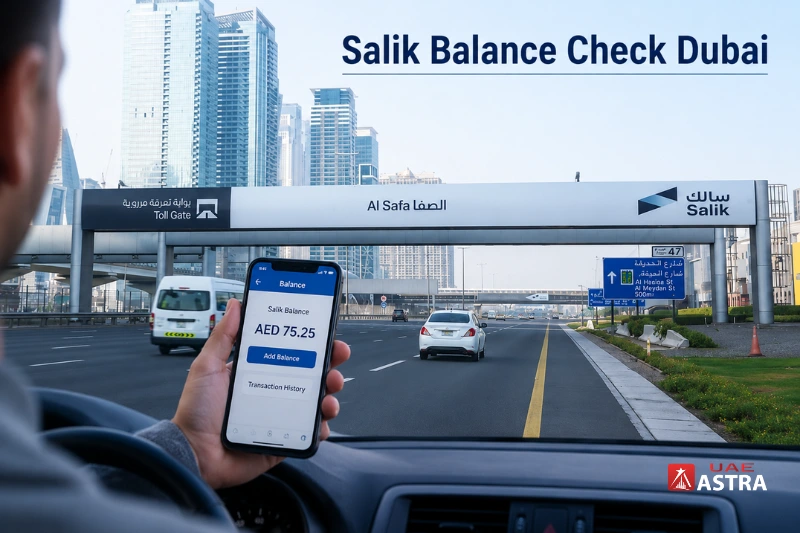
For all Dubai road users who use Salik regularly, it is crucial to manage their Salik account. If you begin to run out of toll credits, automatic deductions might not be successful, causing fines and travel disruptions. Thus, conducting a Salik balance check periodically can prevent drivers from incurring unnecessary charges and ensure that they sail through Dubai toll checkpoints without any hassles.
Dubai’s e-tolling system functions automatically with vehicle registration tags. The toll is deducted from the account of the vehicle each time it passes through a toll gate. This automated process means it’s imperative for users to keep track of their balance regularly using the usual channels.
In today’s age, drivers have a variety of ways to check their balance, such as the official portal, SMS service, Smart Salik application, Dubai Drive platform, and customer service support. Some methods take immediate effect while others need verification information of the account.
What is Salik, and How Does the System Work?
Salik is an automated road tolling system developed by the Roads and Transport Authority (RTA) in Dubai. The system is based on RFID (Radio Frequency Identification) technology, which is attached to vehicles. The toll fee is automatically deducted from the account balance that is associated with the vehicle when it passes over a toll gate.
The system reads the tags on cars electronically and drivers don’t have to stop at toll booths. This will help ease traffic congestion on key Dubai roads such as Sheikh Zayed Road and Al Garhoud Bridge.
You get the following for every registered account:
- Vehicle details
- Registered mobile number
- Traffic file information
- Recharge history
- Toll transaction records
It is crucial to keep a healthy balance in your account, as otherwise you may face violations and penalties for unpaid toll crossings.
Why Regular Balance Monitoring Matters
Typically, users only log into their account when a deduction alert or violation notice has been sent. But there are several benefits of checking your balance on a regular basis.
| Benefit | Why It Matters |
| Avoid penalties | Prevent insufficient balance violations |
| Better travel management | Ensure uninterrupted toll crossings |
| Track deductions | Monitor daily toll expenses |
| Manage multiple vehicles | View balances for all linked vehicles |
| Faster recharge planning | Add funds before the balance becomes low |
Tracking balances is especially crucial for Dubai commuters who may incur various tolls in a day, particularly during rush hours.
Methods Available to Check Your Balance
Digital and offline options are available to drivers for accessing their account information.
| Method | Online/Offline | Instant Result | Login Required |
| Official Website | Online | Yes | Yes |
| Smart Salik App | Online | Yes | Yes |
| SMS Service | Online | Yes | No |
| Customer Support | Offline | Usually | Verification Needed |
| Salik Kiosk | Offline | Yes | Partial |
The fastest are typically the mobile app and SMS service.
Check Balance Through the Official Salik Website

The Salik Official website is still one of the most trusted ways to access an account, as it allows you to view all transactions, recharge options and manage vehicles.
Steps to Access Your Account
Simply visit the official Salik website and go to the login page. Type in your registered account information – username and password. Once authenticated, the dashboard will show the current balance, recent toll deductions, recharge history and attached vehicles.
Users can also:
- Update personal information
- Add new vehicles
- Enable auto recharge
- Review previous transactions
It is a great solution for users desiring account management details rather than just account balance.
Salik Balance Check from the RTA Website

Drivers can also do a Salik balance check from the official website of the RTA Dubai. This approach can be beneficial for customers who have existing relationships with RTAs for parking, vehicle registration, and transportation management.
The RTA portal offers easy access to toll account details, recharges and vehicle information from one dashboard.
Steps to Check Balance on RTA Website

Visit the official RTA Dubai website and click on Salik Services in the main menu. Once you have entered the Salik area, select “Salik Balance”.
Typically, users will be presented with two options for getting a balance. Users will typically be presented with two options to check a balance.
Check Balance by Account Details
Enter:
- Salik account number
- Account PIN code
Fill in the information and then click on the Search button. The amount of money available in the account and the activity in the account will be instantly shown on the screen.
Check Balance by Vehicle Information
Balance checking by registered vehicle information is also possible. In this method, type in:
- Registered mobile number
- Vehicle plate number
After the information is checked, the balance is shown as soon as it is checked.
It is useful if the user doesn’t know their account information but still wants to visit the website.
Check Balance Using Smart Salik App

Smart Salik allows access to the toll account information in real-time, right from a mobile device. This application can be used by Android and iPhone users.
Main Features of the App
The application has been created for ease of access and account management. Users can:
- View live balance
- Recharge instantly
- Enable automatic recharge
- Track toll crossings
- Manage registered vehicles
- Receive notifications
How to Use the App
Install the application and log in with your account details. Upon logging in, user will see their current balance on the dashboard and the deductions that have been made in their recent transactions.
One of the most convenient ways is known as the mobile app, which would provide immediate access without the need for desktop browsing.
Balance Inquiry Through SMS

SMS balance inquiry is one of the most popular methods, as it does not require an internet connection and is very fast.
There are two official methods of SMS for the system.
Option A – Quick SMS Method
SMS is one of the convenient ways for users to check their account balance without opening the Web or Mobile site.
Firstly, go into the messaging app on your mobile phone using the mobile number registered to your account. Then, enter “BAL” in the message window and send it to 5555. You will get an SMS within seconds with your available balance.
This approach is widely adopted due to its ease of use and rapid turnaround, even in areas with limited connectivity.
Option B – Account Verification Method
Another way is to access the balance with information about the account.
Now open the SMS app and enter the message as follows:
SALIK [space] [Account Number] [space] [PIN]
For example:
SALIK 12345 6789
Once typed out correctly, send it to 5959. Your account will be verified and an SMS will be sent with your account information.
Please ensure that the message is being sent from the mobile number registered with your account, as otherwise the verification may not be successful.
Check Balance Using Dubai Drive Platform
Dubai Drive supports several transport-related services, such as tolls.
Once registered to the platform, users can keep track of balances, traffic services and other vehicle info on a single dashboard.
It will be useful for drivers who are more frequent users of the Dubai government mobility apps.
Can you check the balance by Plate Number?
There are a lot of people who look for ways to check the balance based on a vehicle plate number. Most often, linked account information and account ownership verification are necessary for plate-based verification, however.
The system will request:
- Registered mobile number
- Traffic file number
- Account PIN
- Vehicle registration information
The public plate-only access is restricted for security reasons to make it difficult for any unauthorised persons to view any accounts.
Offline Methods for Account Access
While digital services are more prevalent these days, offline services are still available for those who prefer physical assistance.

Salik Kiosks and Service Centers
You can finish inquiries at the following selected:
- Petrol stations
- Customer happiness centers
- Shopping mall kiosks
These systems enable users to check the balance and recharge their accounts with the vehicle details or account numbers.
Offline techniques are very beneficial for those who are not very comfortable on internet platforms.
Recharge Options Available for Drivers
If the balance is not maintained, recharge activities are needed. There are multiple channels of recharge throughout Dubai.
Online Recharge Methods
Funds can be added via:
- Official website
- Smart Salik app
- Banking applications
- Credit cards
- Debit cards
Recharge Card Values
There are some typical amounts for recharge cards:
| Recharge Type | Amount |
| Basic Recharge | AED 50 |
| Standard Recharge | AED 100 |
| Premium Recharge | AED 200 |
Recharge cards are easily found at most supermarkets, fuel stations and convenience stores.
Auto Recharge Feature and Its Benefits
One of the most useful account management features of the day-to-day commuter is the auto-recharge. When the funds are below a chosen limit, the system automatically adds funds.
Benefits of Auto Recharge
- Avoids an imbalance failure of the cable hook.Avoids lack of balance failures in the cable hook.
- Prevents the time lag of manual recharging
- Has continuous toll access
- Saves time for regular drivers and users of vehicles.
Most people link a debit or credit card to allow automatic deductions.
Common Problems During Balance Verification
There are times when users may be unable to log in or fail to verify their access. Most problems are related to the details in the accounts or the registration details that are outdated.
Frequent Technical Issues
| Problem | Possible Cause |
| Invalid login | Incorrect password |
| SMS not working | Unregistered number |
| Missing balance | Server synchronization delay |
| App crash | Outdated application version |
| Failed recharge | Banking verification issue |
Make sure you update your account info regularly to avoid verification issues.
Salik Toll Charges and Deduction Process
All toll crossings automatically draw the correct toll amount from the associated account. The charges are computed electronically after the system scans the tag attached to the vehicle.
There are major toll gate locations at:
- Al Barsha
- Airport Tunnel
- Al Garhoud Bridge
- Al Maktoum Bridge
- Sheikh Zayed Road routes
If a driver is crossing multiple gates every day, they should keep checking their deductions regularly, as they can be rapidly depleted.
Free Salik Timing in Dubai
Usually, current toll-free timing occurs during the night. Free timing is typically offered from 1:00 AM to 6:00 AM, unless there are operational changes or announcements.
Even though the toll schedule has been updated, drivers should always check with official sources to ensure that all policies are up to date, as they could change during holidays or other special events.
What Happens if Your Balance Becomes Zero?
Toll deductions may not be able to successfully complete the toll without an adequate balance in the account. This may ultimately lead to:
- Violation notices
- Additional penalties
- Outstanding toll charges
Financial penalties can add up substantially over repeated unpaid crossings.
That’s why most commuters who use their phones for regular travel make use of balance notifications or automatic recharges.
Best Method for Most Drivers
The Smart Salik app is the best option for the majority of users because they are quick, easy to use, and comes with account management capabilities. When there is no internet access available, however, SMS is the fastest way to get the information.
The official portal might be preferable for users handling multiple vehicles, as it offers more transparency in transactions and account management.
Final Thoughts
Regularly performing the Salik balance check is important for drivers who are driving on toll roads in Dubai on a regular basis. Users can check their accounts from SMS, mobile apps, customer service, or official websites — whichever is most convenient.
The Smart Salik application and an official portal give the most comprehensive account management experience of all the methods. SMS services are still handy for verifying things when there is no Internet access.
Drivers should ensure they have enough balance, check their deductions regularly and make sure they have auto recharge if possible to prevent unnecessary toll violations and payment delays.
Must Read: FAB Balance Check Complete Easy Guide to All Methods in 2026
Frequently Asked Questions
How can I check my balance instantly?
The quickest way to send it is to dial the number listed for your account and type “BAL” into the box.
Can tourists use Salik?
Yes. Many rental car companies in Dubai have toll systems that are registered under their account.
Is the Smart Salik app free?
Yes. It is a FREE application to download.
Can I recharge using a bank card?
Yes. Official debit/credit card recharging platforms accept the most important debit and credit cards.
What is the safest method for account management?
The official website and mobile app are the safest because they offer secure login verification and detailed visibility of transactions.
Disclaimer: The information provided on UAE Astra is for general informational and educational purposes only. We are an independent website and are not affiliated with, endorsed by, or associated with any bank, financial institution, or government authority. While we strive to keep our content accurate and up to date, banking services, fees, policies, and procedures may change without notice. Always verify the latest information through the official website or authorized customer support of the relevant bank or institution before making any financial decision or taking action. UAE Astra is not responsible for any loss or inconvenience resulting from reliance on the information published on this website.