






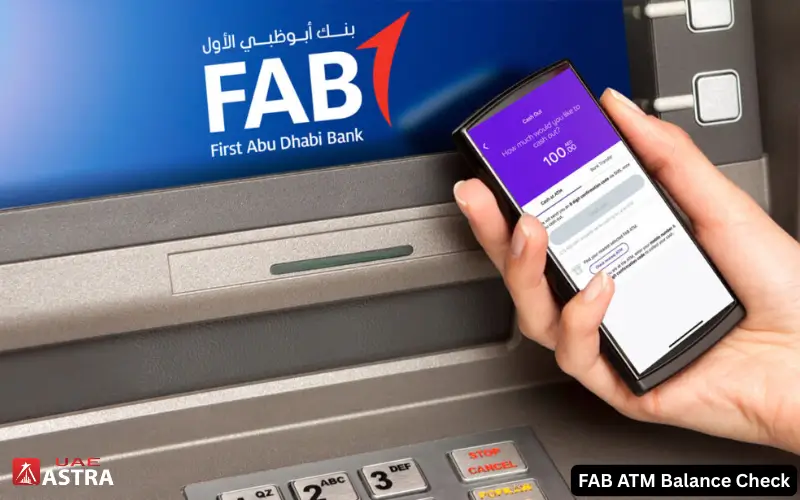
First Abu Dhabi Bank’s banking service that allows users to check their balance on an ATM device is known as FAB ATM balance check. It lets users know how much money is in their account at an ATM without having to use the internet, mobile apps, or online banking.
A very helpful service in everyday life in the UAE. Many people use it before spending money, sending transfers, or checking their salary credit. It’s particularly beneficial for workers, travelers, and those who don’t use mobile banking on a frequent basis. With just a FAB Debit Card and PIN, you can quickly see your available balance anytime.
What You Need Before Checking Balance at FAB ATM
There are a few things that you should have before using the ATM. The following are simple but important for a smooth process:
- First, you need to have a FAB debit card with First Abu Dhabi Bank. You need the card to be able to use ATM services.
- Secondly, you must have the correct ATM PIN. This PIN is given when your card is activated. It’s extremely crucial to keep it private because of safety factors.
- Thirdly, you need to use a working bank ATM that is compatible with the UAE banking network. FAB cards can be used at most ATMs in the country.
Lastly, ensure that your card isn’t blocked or expired. If inactive, the ATM will not function.
Must visit: FAB Balance check with Simple Steps
Step-by-Step Method – How to Check FAB Balance at ATM

At any ATM, you can easily check your balance. The process will only take a few minutes.
Step 1: Place Your FAB Card
Put your FAB debit card into the ATM. Be sure to insert the chip in the right way. Wait until the screen is loaded.
Step 2: Enter Your PIN Securely
Enter the 4-digit PIN. Use care in typing this. Place your hand over the keypad for privacy. If the PIN is repeatedly entered incorrectly, the card could be blocked.
Step 3: Select Balance Inquiry Option
Once the ATM user logs in, they will be presented with a menu. Click on “Balance Inquiry” or “Check Account Balance.” This option will display your available funds at this time.
Step 4: View or Print Balance
On the screen, there will be a presentation of your balance. If necessary, you can also print a mini statement. After checking, remember to take your card back.
Types of Information You Can Get from FAB ATM
The ATM isn’t just for checking out balance. It additionally offers other useful banking information. You can view the real-time account balance. It provides an indicator of availability of funds. You can also get a mini statement. This will display recent transactions such as deposits, withdrawals, or transfers.
Certain ATMs display status updates related to cards. This aids you understand whether your account is active and running as it should be. The ATM is also able to provide basic banking services, such as withdrawing cash.
FAB ATM Balance Check vs Other Methods
There are several methods of checking your balance. Each method has its own benefits.
ATM vs Mobile App
ATM is not connected to the Internet. Mobile apps are quicker but you need to log in and have an internet connection.
ATM vs Online Banking
Online banking provides greater functionality, while ATM is more straightforward and convenient if you need to perform simple tasks like checking your balance.
ATM vs SMS Banking
While SMS banking can be helpful in the absence of the internet, ATM offers more comprehensive and precise information instantly.
Benefits of Using FAB ATM Balance Check
Using FAB ATM balance check offers several advantages: Few advantages of using FAB ATM balance check:
- This is a popular service for its simplicity and utility to all.
- The one upside is that it doesn’t require the internet. You can check your balance at any time.
- It works around the clock in the UAE, without being restricted by bank timing.
- It requires just a few seconds and is quick.
- It’s also quite beneficial for the salary cardholders and the workers who favor the offline banking.
- Most significantly, it is safe if used correctly, with the assistance of the PIN security.
Common Problems and Their Solutions
Some minor problems may arise while users are using an ATM. These are simple issues that are easily solved.
Card Not Working
If the card is not functioning, see if it has expired or is damaged. If necessary, use another ATM.
Wrong PIN Issue
If you enter the wrong PIN, enter it carefully. If several attempts, due to a mistake, failed, please contact customer support.
ATM Not Showing Balance
This can occur because of network problems. Use another ATM.
Card Blocked
Please call First Abu Dhabi Bank’s customer service to clear up the block on your card.

Safety Tips for FAB ATM Usage
- Here are some tips to ensure your safety when using FAB ATM’s.
- It is essential to be safe while banking. Always follow these simple tips.
- Do not give out your PIN. Not even the bank employee will request it.
- Cover the keypad when entering the PIN code to prevent someone from stealing it.
- Only use trusted and official ATM machines in secure locations.
- Avoid giving strangers access to ATMs.
- When making a purchase, always get your card and receipt.
- These are all minor measures to help keep your money and account safe.
Where Can You Use FAB ATM Balance Check?
Fab ATM services are available throughout the UAE. ATMs are readily accessible at petrol stations, shopping malls, and bank branches.
There are many ATMs in major cities such as Dubai and Abu Dhabi. This extensive network provides customers with convenient access to banking services.
Who Should Use FAB ATM Balance Check?
- There is a whole host of users who can benefit from this service.
- For those who are on a salary basis and are paid on a monthly basis, they can easily check their balance.
- Those without mobile banking services can still use the ATM services.
- ATM’s are also available for travelers to make instant balance checkups.
- This is quite useful for those customers who take the offline route for banking.
FAB ATM Balance Check Fees & Charges
Most ATM transactions at FAB are free. In some instances, however, charges may apply to non-FAB ATMs, depending on the ATM bank’s policy. Transacting at a FAB or partner bank ATM is always free and secure.
Conclusion
Checking out your ATM balance is one of the most convenient services that you can get from your bank in the UAE, which is called FAB ATM. It allows customers to easily confirm their funds anywhere, without the need for the web or mobile applications. Users have the option of accessing their account balance in seconds with a simple debit card and PIN number. Easy, quick, and accurate. Customers can handle their finances safely and confidently by adhering to safety guidelines and using official ATMs. The service is also crucial for regular banking transactions in the UAE and is being used by thousands of people on a daily basis.
You Also Like:
NBAD Balance Inquiry
NOL Card Balance Check 2026
FAB ATM Balance Check FAQs
1. How can I check my FAB balance at an ATM?
Place your FAB Debit Card in the card reader, input your PIN, and choose “Balance Inquiry” from the menu. The balance will be immediately visible on the screen.
2. What should I do if my FAB card is not working at the ATM?
Always determine if the card has expired or is damaged first. If it is okay, go to another ATM. If the problem persists, reach out to First Abu Dhabi Bank’s customer service.
3. Why is my FAB ATM showing “Invalid PIN”?
Occurs if the incorrect PIN is entered. Try again carefully. You can reset your PIN in FAB banking services or in a branch if you forget.
4. Can I check my FAB balance without internet?
Yes, balance inquiry on the ATM is 100% offline. Does not require mobile data or internet.
5. What should I do if the ATM does not show my balance?
This could be a technical thing. Use another ATM or wait a few minutes and use another ATM. If the problem persists, call the bank.
6. Is FAB ATM balance check free?
Yes, there is no charge for most, if not all, balance enquiries at FAB or partner ATMs. No-fee ATMs are present on the network, but at some non-network ATMs, charges may apply.
7. What if my FAB card gets blocked after ATM use?
This typically occurs after several incorrect PIN entries. If you have a card blocked, please reach out to FAB support ASAP.
8. Can I use any ATM in UAE for FAB balance check?
At the moment it is possible to use most ATMs in the United Arab Emirates, however FAB ATMs are recommended for service.
9. How do I keep my ATM transactions safe?
Make sure to cover your PIN with your hand when you enter it, be aware of who you are at the ATM, and never give your card number to anyone.
10. Can I print my balance statement from ATM?
Yes, You can print your ATM balance sheet. There are plenty of ATMs that provide mini statements. Recent transactions, and your balance, can be printed at once.
Disclaimer: The information provided on UAE Astra is for general informational and educational purposes only. We are an independent website and are not affiliated with, endorsed by, or associated with any bank, financial institution, or government authority. While we strive to keep our content accurate and up to date, banking services, fees, policies, and procedures may change without notice. Always verify the latest information through the official website or authorized customer support of the relevant bank or institution before making any financial decision or taking action. UAE Astra is not responsible for any loss or inconvenience resulting from reliance on the information published on this website.